
Student Learning Space
Log in to the Singapore Student Learning Space (SLS) at learning.moe.edu.sg and follow these steps to set up your account and reset your password.
Getting started with Singapore Student Learning Space Instructions for Students
System Requirements
1. The Singapore Student Learning Space (SLS) is accessible through the internet browsers on either Windows PC, Mac, iPad or Android tablets (with screen size larger than 7 inches for good user experience).
Initial Login and Password Change
2. SLS can be accessed from https://learning.moe.edu.sg (opens in new tab). The username can be found in the cover letter while the password is in a separate letter.
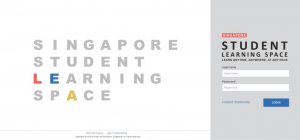
Fig 1: Lock Screen
3. During the FIRST login, you will be prompted to change your password.
4. Please note that the password must contain alphanumeric characters and is case-sensitive.
5. After you have changed your password, you will be prompted with an option to add in your email address in the “Password Reset Email Address” field. A verification email will be sent to this email address
Note:
If you decide to leave the “Password Reset Email Address” field empty, should you need a new password (e.g. you have forgotten your password), you can perform a self-help password reset, call helpdesk or alternatively you can also contact your teacher.
SLS Helpdesk Support
Tel: (65) 6702 6513
Email: helpdesk@sls.unfinity.com
User Guide Website: https://static.learning.moe.edu.sg/UserGuide/login-troubleshooting.html (opens in new tab)
Operating Hours
Mondays-Fridays: 9am – 9pm
Saturdays: 9am – 3pm
*Closed on Sundays & Public Holidays
SLS Support for Home-based Learning
During the period of Home-based Learning, students can
contact the respective subject teachers or form teachers on
SLS matters via WhatsApp message.
For SLS password reset or unlocking of account, students
can contact the school office at 6457 6454 and leave a
message with their name, form class and handphone
number.
6. The next step would be to set the Security Questions. The Security Questions will be used to verify that you are the legitimate account holder, in the event if you should need to perform a password reset via self-help or helpdesk support.
7. PASSWORD RESET
In the event if you have forgotten your password, you can perform a self-help password reset, either by verifying your identity via the password reset link or answering the security questions correctly.
Password Reset using Password Reset Link Option
7.1 Click on the “Forgot Password” button at the login page and you will need to enter your username.
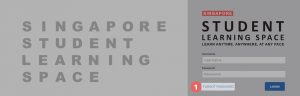
7.2 Select Send a password reset link to your email.
7.3 Click on Submit.
7.5 An email with the password reset link will be sent to your email address.
7.6 Click on the reset password link in the email.
• If the link has expired, you can request for another verification email by clicking on the Resend Verification Email button.
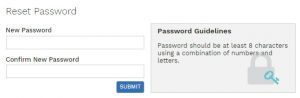
7.7 In the Reset Password page, enter a new password.
7.8 You will need to enter the new password twice to confirm that you have entered it correctly.
7.9 Click on Submit.
7.10 Once you receive the email click on the link in the email and you will be guided to setup
the new password.
8. Password Reset by Answering Security Question
8.1 Click on the “Forgot Password” button at the login page and you will need to enter your username.
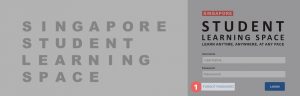
8.2 Select Answer Security Question
8.3 Click on Submit.
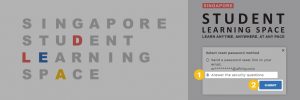
8.4 In the Security Questions page, key in the answers to the security questions.
• You must answer the security questions correctly before you can reset your password.
• Click on Submit.
In the event if you had answered the questions incorrectly, you will be brought to
the Password Reset Unsuccessful page.
• Click on the Retry button to try again.
• You can attempt up to 6 times before your account is locked for security reasons
8.5 If you had answered the security questions correctly, you will be brought to the
Reset Password page.
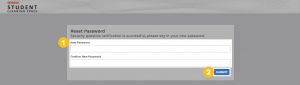
8.6 Set a new Password
• Click on Submit.